
Deploying ProLiant DL320 & DL360 Servers into Third-Party Racks

Deploying Compaq ProLiant DL320 and DL360 Servers into Third-Party Racks 13
13NT-1000A-WWEN
Preparing the Server
Install all internal options such as PCI boards, memory or processors before mounting the server
into the rack. Refer to the Setup and Installation Guide that ships with the server for information
on installing options.
Installing ProLiant servers in the Rack
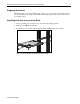
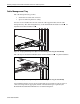
1. Start by installing servers at the bottom of the rack and working upwards.
2. Slide the server 1 into the rack rails.
3. Attach the server to the rack rails using the thumbscrews 2 on the server faceplate.
1
2
2
Figure 9: ProLiant DL360 server third-party rack installation