
Deploying ProLiant DL320 & DL360 Servers into Third-Party Racks

Deploying Compaq ProLiant DL320 and DL360 Servers into Third-Party Racks 12
13NT-1000A-WWEN
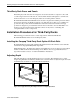
Third-Party Rack Doors and Panels
Most third-party rack enclosures are designed to be used in raised-floor computer rooms, with
cool air being forced in from the bottom of the rack and exhausted through the roof. Therefore,
the front and rear doors of most third-party racks are solid and permit no airflow.
ProLiant DL320 and ProLiant DL360 servers should not be placed in a built-up enclosure unless
the enclosure has been specifically designed to accommodate the product, proper ventilation is
provided for the product, and the manufacturer's instructions have been followed. Compaq
products are designed to provide airflow from the front of the rack to the rear. Installation of a
Compaq component in a third-party rack with solid doors may lead to overheating and
consequent failure of those components.
Installation Procedures for Third-Party Racks
The following procedures are used to create deployments of ProLiant DL320 and
ProLiant DL360 ultra-dense servers in third-party racks.
Installing the Compaq Third-Party Rack Option Kit Rack Rails
ProLiant DL360 servers ship with standard rails attached. These rails will mate to the rack rails
found in the Compaq Third-Party Rack Option Kit.
Install all rack rails to the third-party rack before installing any servers. Compaq provides adapter
washers for M5 and 10-32 thread mounting screws. Refer to the Compaq Third-Party Rack
Option Kit Installation Guide” for rack rail installation instructions.
Adjusting Depth
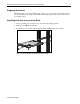
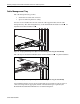
The rack rails allow for depth adjustment from 22 to 33 inches. The adjustment is a tool-free
design, using thumbscrews. Turn the thumbscrews counterclockwise to adjust the depth, then turn
the thumbscrews clockwise to secure the rack rail adjustment.
Figure 8: Compaq Third-Party Rack Option Kit rack rail depth adjustment