
Deploying ProLiant DL320 & DL360 Servers into Telecommunications (Telco) Racks

Deploying ProLiant DL320 and DL360 Servers into Telecommunication (Telco) Racks 8
13NS-1000A-WWEN
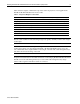
Table 2 lists the weights of individual components used in deployments of Compaq ProLiant
DL320 and ProLiant DL360 servers in telco racks.
Table 2. Component Weights for Calculation
Item Weight (ProLiant DL320) Weight (ProLiant DL360)
Configured (1 server) 25.00 lb 29.00 lb
Fully configured (42 servers) 1,030 lb (approx) 1,200 lb (approx)
Wide Ultra3 hard disk drive 1.90 lb 1.90 lb
Remote Insight Lights-Out Edition option 0.50 lb 0.50 lb
Telco Rack Option Kit rack rails (set) 2.50 lb 2.50 lb
KVM cable bundle 1.42 lb 1.42 lb
High voltage Y power cable 1.00 lb 1.00 lb
Server console switch 5.25 lb 5.25 lb
WARNING: External cable weight contributes to the overall weight of the rack installation.
Because cable installation and load-bearing designs vary greatly, carefully consider cable weight
in all designs.
WARNING: Do not exceed the specified weight limit for the telco rack or the floor. When
creating deployments of Compaq ProLiant DL320 or ProLiant DL360 ultra-dense servers in a
telco rack, include in the weight calculations the weight of the rack rails, cable management trays,
and cables whose load is bearing on the rack.
CAUTION: Ensure that the cabling design provides both adequate airspace for thermal
dissipation and strain relief for the cable connections on the Compaq ProLiant DL360 or ProLiant
DL320 server if the cable management tray is not used. The cable management tray design
reduces cable congestion and relieves strain on connectors.