
Deploying ProLiant DL320 & DL360 Servers into Telecommunications (Telco) Racks

Deploying ProLiant DL320 and DL360 Servers into Telecommunication (Telco) Racks 18
13NS-1000A-WWEN
Appendix A
Unit Identification
In an ultra-dense server deployment, properly identifying a server requiring service can be
difficult. The Compaq ProLiant DL320 and ProLiant DL360 servers include special LEDs that
identify servers requiring service.
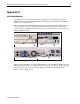
The Compaq ProLiant DL320 and ProLiant DL360 server Unit Identification (UID) features on
the front and rear of the server simplify server identification in deployments of ultra-dense
servers. The faceplate LED and switch are located on the right of the drives. The rear UID is an
integrated LED and switch.
1
2
3
1
2
3
Figure 14: Unit Identification (UID) LEDs and switches (DL320 and DL360)
When the UID switch
2
is on, the blue LEDs illuminate on the front
1
and back
3
of the server,
marking it as targeted for service. This front-and-rear feature reduces the risk of disconnecting
cables from the wrong server. Front and rear NIC link and NIC activity LEDs also help to
identify servers requiring service.