
Deploying ProLiant DL320 & DL360 Servers into Telecommunications (Telco) Racks

Deploying ProLiant DL320 and DL360 Servers into Telecommunication (Telco) Racks 16
13NS-1000A-WWEN
Console Switches, Monitors, and Keyboards
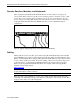
The Compaq ProLiant DL320 and ProLiant DL360 servers can be cabled to a Compaq 1U
console switch. Each of these low-profile console switches provides connectivity for up to eight
servers. The console switches can be cascaded one level to provide connectivity for up to 64
servers. Using a 2U Compaq TFT display and Compaq keyboard options, customers can deploy
Compaq ProLiant DL320 and ProLiant DL360 ultra-dense servers in minimal rack space
configurations.
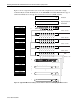
Figure 12: Typical cabling using server console switches (DL360 shown)
Cabling
Cabling will vary based on the I/O options. The Compaq ProLiant DL320 ships with a standard
10-foot IEC-IEC power cable for rack mount deployment using either a Power Distribution Unit
(PDU) or Uninterruptible Power Supply (UPS). The ProLiant DL360 server ships with a standard
12-foot country specific power cable. For specific cabling solutions developed by Compaq, refer
to the white papers, “Compaq ProLiant DL320 Ultra-Dense Server Deployment in Compaq
Racks” and “Compaq ProLiant DL360 Ultra-Dense Server Deployment in Compaq Racks”
available on the Compaq website:
www.compaq.com
CAUTION: Any cabling solution must ensure sufficient airspace for thermal dissipation and
provide strain relief for cable connectors.
Note: For high-voltage installations, Compaq offers a High Volume Deployment Option Kit
containing 11 Y-shaped high voltage power cables for powering two servers with one wire. This
design provides clean power cable management.