
Deploying ProLiant DL320 & DL360 Servers into Telecommunications (Telco) Racks

Deploying ProLiant DL320 and DL360 Servers into Telecommunication (Telco) Racks 13
13NS-1000A-WWEN
Installation Procedures for Telco Racks
Adapt the following procedures to create deployments of ultra-dense Compaq ProLiant DL320
and ProLiant DL360 servers in a telco rack.
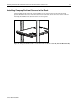
Installing the Compaq Telco Rack Option Kit Rack Rails
Install all rack rails to the telco frame before installing any servers. The rack rail mounting
bracket opening adjusts from 3 to 5 inches (7.62 to 12.7 cm) to accommodate varying telco frame
thickness. The adjustment screws require a #15 Torx driver or slothead screwdriver.
Refer to the Compaq Telco Rack Option Kit Installation Guide for complete instructions.
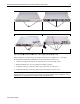
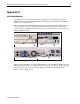
Compaq ProLiant DL320 and ProLiant DL360 servers ship with standard server rails attached.
These rails must be removed and replaced with the optional server rails included in the Telco
Rack Option Kit.
Figure 9: Replacing server rails with Telco Rack Option Kit server rails (DL360 shown)