
Configuring a Pre-eXecution Environment (PXE) using Red Hat Linux 7.0 on Compaq ProLiant Servers


Configuring a Pre-eXecution Environment (PXE) using Red Hat 7.0 Linux on Compaq ProLiant Servers 7
14K2-0301A-WWEN
For FTP Installation
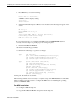
For FTP installation, follow the steps outlined below:
14. Copy the Red Hat CD-ROM to /home/ftp for anonymous FTP access.
Upon completion of these steps, the Red Hat CD-ROM files are available over NFS or FTP, for
the PXE boot image to use for installation. The next section describes how to install Red Hat 7.0
Linux via PXE to a target.
Launching the PXE Image for installing Red Hat Linux
7.0
If you have completed all the steps above, you are now ready to launch the PXE image for Red
Hat 7.0 Linux.
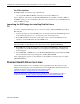
1. Connect the target server and the PXE server on an isolated network. After PXE support has
been enabled and setup to boot to the network, power on the target server.
2. Press F12 at POST for network boot. The target server connects to the PXE server and
attempts to obtain an IP address from the DHCP server.
Note: If the "Show Setup" prompt is disabled on a ProLiant DL360, this F12 will not appear.
The system will boot depending upon the order selected in the "Option ROM Setup".
3. Press F12 again to begin the network boot and download the PXE image. After the Linux
image takes over, the Linux installation process begins. Several prompts for language and
keyboard appear.
4. Select FTP, NFS, or HTTP access to the Red Hat CD-ROM when prompted. Enter the PXE-
Server’s IP address and corresponding path to the Red Hat CD-ROM.
After completing the steps above, the remainder of the installation works the same as a regular
CD-ROM installation.
ProLiant Health Driver for Linux
A ProLiant Health driver is now available for Linux (cpqhealth) users. This driver provides
hardware monitoring support for select ProLiant servers using Red Hat 7.0 Linux. The driver is
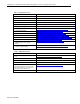
available through the Compaq Server Download Center website
http://www.compaq.com/support/files/server/us/index.html.
Additional information on using this driver is available in the Linux Health Driver How-to
document located at ftp://ftp.compaq.com/pub/products/servers/linux/linuxhealth.pdf
.