
Configuring a Pre-eXecution Environment (PXE) using Red Hat Linux 6.2 on Compaq ProLiant Servers

Configuring a Pre-eXecution Environment (PXE) using Red Hat 6.2 Linux on Compaq ProLiant Servers 4
14K1-0301A-WWEN
Table 2. Client machine requirements
Red Hat 6.x Linux
PXE-enabled personal computer with a minimum PXE revision of NetPC.99c and a minimum of 64 MB RAM.
System must be setup to boot from the network before HDD.
Active DHCP server on the network so the client can acquire an IP address.
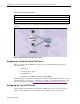
Figure 1 shows a typical setup for Red Hat 6.2 Linux including the servers and the client target
machine.
Figure 1. Typical PXE setup for Red Hat 6.2 Linux
Preparing for a Red Hat Linux PXE Server
Before proceeding with the PXE server setup be certain to install Red Hat Linux with the
following aspects.
• FTP support
• C and C++ Development
• Static IP Address
• Red Hat Source (RPMS, specifically, the PXE RPM)
The PXE package for Red Hat contains the Preboot eXecution Environment server and code bits
needed for Linux to boot from a boot disk image is available on your Red Hat install and source
disks or from the following link: http://rpmfind.net/linux/rpm2html/search.php?query=pxe.
Setting Up the Linux PXE Server
After installing a static IP address, allowing for both FTP support and software development
support, setup the PXE server by following the steps detailed in the following sections.
PXE Client
(Target)
DHCP Server
or BootP
PXE Server
with OS Image