
Compaq ProLiant DL360 Ultra-Dense Server Deployment in Compaq Racks

Compaq ProLiant DL360 Ultra-Dense Server Deployment in Compaq Racks 85
128H-1100B-WWEN
4.6.2 Console Management Choices
4.6.2.1 Remote Console Management Cables
Refer to the ProLiant DL360 Setup and Installation Guide for more details on installing Compaq
Remote Insight Lights-Out Edition in ProLiant DL360. Note that ProLiant DL360 provides an
internal cable that eliminates the need for the external loop-back cable for the
keyboard/mouse and the external power adapter. This greatly reduces the total number of
cables to be managed and saves the trouble of providing 42 more power outlets.
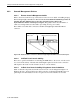
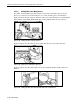
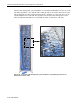
There will be one CAT5 cable connected to the Remote Insight Lights-Out Edition RJ-45
connector.
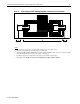
Figure 4-20. Network cables connection to Remote Insight Lights-Out Edition RJ-45 network jacks
4.6.2.2 Off-Rack Local Console Cabling
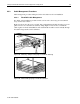
There are no special considerations in connecting the KVM cables to the servers. A local console
is a console in the vicinity of the rack. The cable lengths required for local console connection
will depend on the location of the off-rack consoles or console switches.
4.6.2.3 In-Rack Local Console Cabling Using Server Console Switches
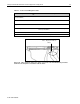
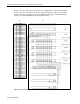
Table 4-3 lists the components used in this section for local console management. Figure 4-21
illustrates the video, keyboard and mouse cables connection on the ProLiant DL360 server rear
panel. Figure 4-22 demonstrates how five 1x8-port Server Console Switches are cascaded.
Remote Console
Management Network Cable
Remote Insight Lights-Out
Edition card