
Compaq ProLiant DL360 Ultra-Dense Server Deployment in Compaq Racks

Compaq ProLiant DL360 Ultra-Dense Server Deployment in Compaq Racks 69
128H-1100B-WWEN
brackets. Customers can use the 12 ft cables and fold them in the rack side panel compartments,
or acquire shorter length cables instead, for either fixed or sliding rails installations.
4.3.4 Power Cord Routing
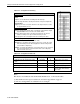
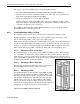
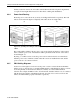
Route the power cords as shown in (a) and (b) for sliding and fixed rails, respectively. The rack
rails are not shown in the figure for simplicity. The cables shown are single cables.
(a) (b)
Figure 4-4. (a) Sliding rail cabling for low voltage cables. (b) Fixed rail cabling for low voltage
cables.
The routing will be similar for the Y-power cords, except tying the Y-junctions on the vertical
frame so that the power cords on the dual-side will be presented towards the rear of the rack, as
shown in Figure 4-1.
By doing so, it will be easier to locate the power cords in vertical order. It is recommended to
label the power cords to minimize confusion after the servers are installed in the rack, and the
power cords are to be connected to them.
4.3.5 PDU Cabling Diagrams
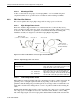
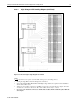
Sections 4.3.5.1 through 4.3.5.12 show how the power cords are connected between the PDUs
and the servers or other devices, for example, KVM switch box. The illustrations in these sections
are shown primarily for the electrical connections, and they do not have full mechanical
relevance. For example, the PDUs seem to be in horizontal orientation. This is not to be confused
with the physical orientation of the PDUs in the rack. See Section 4.3.1 and 4.3.2 on how and
where to mount the PDUs properly in the racks, respectively.