
Compaq ProLiant DL360 Ultra-Dense Server Deployment in Compaq Racks

Compaq ProLiant DL360 Ultra-Dense Server Deployment in Compaq Racks 67
128H-1100B-WWEN
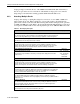
There are two option kits available for the Vertical-mount PDU brackets:
1. The Vertical-Mount PDU Bracket with High Voltage Cables Kit (P/N 166097-B21)
This kit contains 4 Vertical-mount PDU brackets, 11 Y-cables, and accessory hardware for
high-volume deployment using High Voltage PDUs.
2. The Vertical-Mount PDU Bracket Kit (P/N 191265-B21)
This kit contains 8 Vertical-mount PDU brackets and accessory hardware for high-volume
deployment. This kit is primarily meant for Low Voltage PDU installations where the power
cords that come with the servers can be used.
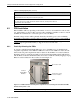
The installation card in these kits contains detailed instructions on how to mount the Vertical-
Mount PDU Brackets on a PDU and in a rack.
4.3.2 Installing Multiple PDUs in a Rack
The following sections describe where to mount the necessary number of PDUs in a rack.
In all the installations, route the input power cord for each PDU either towards the top or the
bottom of the rack, depending on the power source outlet locations.
Make sure that the rack grounding wires for all the PDUs are properly connected by following the
instructions came with the PDUs. Grounding accessories are described in Section 1.2 (Glossary).
Section 3.1 – 3.14 show several rack configurations including the PDU locations. Note that these
PDU locations will vary depending on whether the sliding-rails or the fixed-rails are used.
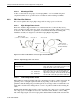
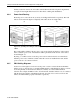
4.3.2.1 Mounting 2 PDUs on One-Side
This installation applies to 36U and 42U Compaq 9000- and 7000-series racks. When mounting
one or two PDUs, mount the PDUs on the side where the cables exit the cable trays. This will
allow the power cords to be routed easily to the cable trays. If fixed-rails are used for the servers,
then mount the PDUs on the left side, viewing from the front. If sliding-rails are used, then mount
the PDUs on the right side, viewing from the front.
4.3.2.2 Mounting 1 PDU on Each Side
This procedure is primarily for 22U racks. It is not recommended to
mount the PDU in these positions for 36U or 42U racks.
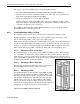
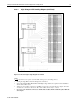
4.3.2.3 Mounting 3 PDUs
This installation applies to 36U and 42U Compaq 9000- and 7000-
series racks. When mounting three PDUs, mount two PDUs on the
side where the cable trays are closest to the rear frame of the rack,
and mount the third PDU in the upper half of the other side. This
will allow the power cords to be routed relatively easily. If fixed-
rails are used, then mount the two PDUs on the left side, viewing
from the front. If sliding-rails are used, then mount the two PDUs on
the right side, viewing from the front, as shown in Figure 4-2.
Figure 4-2. Three PDUs installed in a 42U rack.