
Compaq ProLiant DL360 Generation 2 Server Setup and Installation Guide

Compaq Confidential – Need to Know Required
Writer: Ed Giblin Project: Compaq ProLiant DL360 Generation 2 Server Setup and Installation Guide Comments:
Part Number: 233832-001 File Name: h-ch7 Server Cabling.doc Last Saved On: 9/14/01 1:53 PM
Chapter 7
Server Cabling
This chapter provides guidelines to help in making informed decisions, about
cabling the server and hardware options, to optimize performance. For
complete and comprehensive information, use this chapter along with the
technical information on the Quick Hardware Installation Poster and the labels
attached to the inside of the server access panel.
Internal Cabling
The following sections explain internal cabling configurations for the
ProLiant DL360 G2 server.
Internal Cabling for Mass Storage Devices
Internal mass storage devices in the ProLiant DL360 G2 server require
minimum cabling, as described below.
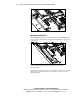
Hot-Plug SCSI Hard Drives
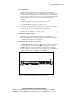
The ProLiant DL360 G2 standard configuration for internal SCSI hard drives
does not require any cabling, because both devices connect directly to the
SCSI backplane. The SCSI backplane
connects directly to the system
board
.