
Compaq ProLiant DL360 Generation 2 Server Setup and Installation Guide
6-6 Compaq ProLiant DL360 Generation 2 Setup and Installation Guide
Compaq Confidential – Need to Know Required
Writer: Ed Giblin Project: Compaq ProLiant DL360 Generation 2 Setup and Installation Guide Comments:
Part Number: 233832-001 File Name: g-ch6 Integrated Lights Out.doc Last Saved On: 10/12/01 11:38 AM
Using the Integrated Lights-Out Security
Override Jumper
The iLO Security Override Jumper allows emergency access to the
administrator with physical control of the server’s system board. Setting the
iLO Security Override Jumper allows login access, with all privileges, without
a user id and password.
To set the iLO Security Override Jumper:
1. Power down the server, see “Powering Down the Server” in Chapter 3.
2. Remove the server access panel, see “Removing the Access Panel” in
Chapter 3.
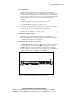
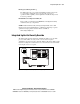
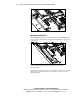
3. Locate the three pins of J29 and move the jumper from the front and
center pins to the center and rear pins to override password security. J29
is to the front of the 30 pin Remote Insight Connector.
4. Press the Power/On Standby switch to power on the server.
5. Logon to the iLO and reset the passwords.
A warning message will be displayed on the iLO Web pages indicating the
iLO Security Override function is currently active. An iLO log entry will be
added recording the use of the iLO Security Override. An SNMP alert may
also be sent upon setting or clearing the iLO Security Override function.
In the unlikely event it is necessary, enabling the iLO Security Override also
enables the iLO boot-block to be flashed. The boot-block will be exposed
until the iLO is reset. Compaq recommends the iLO be disconnected from the
network until the reset is complete.
To reset the iLO Security Override Jumper:
1. Power down the server.
2. Remove the Security Override Jumper from the rear and center pins of
J29 and place between the front and center pins.
3. Replace the server access panel.
4. Press the Power/On Standby switch to power on the server and resume
normal operation.