
Compaq ProLiant DL360 Generation 2 Server Setup and Installation Guide

Integrated Lights Out 6-5
Compaq Confidential – Need to Know Required
Writer: Ed Giblin Project: Compaq ProLiant DL360 Generation 2 Setup and Installation Guide Comments:
Part Number: 233832-001 File Name: g-ch6 Integrated Lights Out.doc Last Saved On: 10/12/01 11:38 AM
■
Integrated Management Log
The iLO manages the server’s Integrated Management Log that can be
accessed using a standard browser, even when the server is not
operational. This capability can be helpful when troubleshooting remote
host server problems.
■ ROM-Based Configuration Utility F8
This versatile, system-independent ROM-Based Configuration Utility
enables fast and easy setup of iLO.
NOTE: Additional functionality for Integrated Lights-Out, such as full
Graphics Console and Virtual Media, is available by purchasing a separate
option from Compaq. More details of iLO are available at
www.compaq.com/lights-out
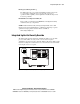
Integrated Lights-Out Security Override
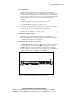
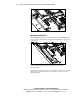
The iLO Security Override allows the administrator full access to the iLO
processor. This will be necessary in the event of a lost or forgotten
administrator password and also to flash the iLO boot-block. The iLO Security
Override is a jumper located inside the server and cannot be activated without
removing the server access panel.
4
3
2
1
Figure 6-2. Security Override Jumper (Non-override position)