
Compaq ProLiant DL360 Generation 2 Server Setup and Installation Guide

Integrated Lights Out 6-3
Compaq Confidential – Need to Know Required
Writer: Ed Giblin Project: Compaq ProLiant DL360 Generation 2 Setup and Installation Guide Comments:
Part Number: 233832-001 File Name: g-ch6 Integrated Lights Out.doc Last Saved On: 10/12/01 11:38 AM
■
Virtual Media
With the Virtual Floppy Drive, an administrator can easily direct a
remote host server to boot and use a standard media from anywhere on
the network, thus saving time and increasing efficiency by eliminating
the need to visit a remote server to insert and use a diskette. This feature
allows administrators to carry out any of the following functions
remotely:
G Run Compaq User Diagnostics on remote host servers
G Apply ROMPaq™ upgrades to remote servers
GDeploy an operating system on remote servers from network drives
GPerform disaster recovery of failed operating systems
Virtual media is available as a separate option.
■ Remote Firmware Update
This feature ensures that iLO is always up-to-date with the latest
firmware available from Compaq. Updates to the ROM code on iLO is
accomplished through the browser interface.
■ Dedicated LAN network connectivity
A 10/100 Mbps Ethernet chip on the iLO provides administrators with a
dedicated network connection to iLO
. The iLO provides in-band
SNMP notification of server problems on a real-time basis without
separate telephone connections or modem sharing devices. The NIC can
autoselect speeds between 10 Mbps and 100 Mbps.
1
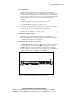
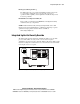
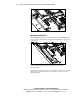
Figure 6-1. Location of iLO Management Port on server rear panel