
Compaq ProLiant DL360 Generation 2 Server Setup and Installation Guide

4-16 Compaq ProLiant DL360 Generation 2 Server Setup and Installation Guide
Compaq Confidential – Need to Know Required
Writer: Ed Giblin Project: Compaq ProLiant DL360 Generation 2 Server Setup and Installation Guide Comments:
Part Number: 233832-001 File Name: e-ch4 Server Installation.doc Last Saved On: 8/31/01 11:42 AM
Maintenance and Service Procedures
In addition to the material in this guide, the Compaq ProLiant DL360
Generation 2 Maintenance and Service Guide provides specific information
required for general maintenance and component replacement, including:
■ Spare part numbers
■ Removal and replacement procedures
■ Diagnostic tools
■ Component specifications
To access the maintenance and service guide, refer to the Documentation CD.
Extending the Server from the Rack (Sliding Rail
Option)
To perform some installation and maintenance procedures, the server has to be
extended from the rack.
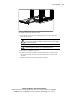
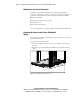
To extend the server from the rack:
1. Loosen the thumbscrews that secure the server faceplate to the front of
the rack.
2. Extend the server on the sliding rails until the server rail-release latches
engage.
Figure 4-13. Extending the server from the rack