
Compaq ProLiant DL360 Generation 2 Server Setup and Installation Guide

Server Installation 4-13
Compaq Confidential – Need to Know Required
Writer: Ed Giblin Project: Compaq ProLiant DL360 Generation 2 Server Setup and Installation Guide Comments:
Part Number: 233832-001 File Name: e-ch4 Server Installation.doc Last Saved On: 8/31/01 11:42 AM
WARNING: Do not place anything on power cords or cables. Arrange them so
that no one can accidentally step on or trip over them. Do not pull on a cord or
cable. When unplugging the cord from the electrical outlet, grasp the cord by
the plug.
To power up the server:
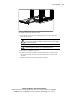
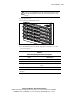
1. Press the Power On/Standby switch.
Figure 4-12. Powering up the server
2. Use the LED information in the following table to identify a successful
power-up sequence.
Table 4-2
LED Activity During the Power-On Sequence
Action LED Response
Power cord is disconnected. No LEDs on.
Power cord is connected. Power On/Standby LED turns amber.
Power On/Standby switch is pressed. Power On/Standby LED goes from amber to
green.
Server is powering up. Hard drive activity LED turns on.
Note: For a detailed explanation of all system LEDs, see Appendix C, “Status LED
Indicators.”