
Compaq ProLiant DL360 Generation 2 Server Setup and Installation Guide

Server Installation 4-11
Compaq Confidential – Need to Know Required
Writer: Ed Giblin Project: Compaq ProLiant DL360 Generation 2 Server Setup and Installation Guide Comments:
Part Number: 233832-001 File Name: e-ch4 Server Installation.doc Last Saved On: 8/31/01 11:42 AM
78 691011
1 2 3 4 5
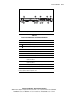
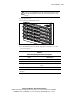
Figure 4-10. Rear panel connectors on the ProLiant DL360 G2 server
Table 4-1
Rear Panel Connectors and Connection Order
Location Connector
64-bit expansion slot 1
64-bit expansion slot 2
Mouse connector (green)
Serial connector (teal)
Integrated Lights Out (iLO) Management Port
USB Ports 1 and 2
Video connector (blue)
RJ-45 Gb Ethernet connector with 10/100/1000-Mb/s
operation for NIC 2
RJ-45 Gb Ethernet connector with 10/100/1000-Mb/s
operation for NIC 1
Hot-plug keyboard connector (purple)
Power connector
Note: The location numbers in this table correspond to the connection order
for the peripheral cables and power cord.