
Compaq ProLiant DL360 Generation 2 Server Setup and Installation Guide

Server Installation 4-9
Compaq Confidential – Need to Know Required
Writer: Ed Giblin Project: Compaq ProLiant DL360 Generation 2 Server Setup and Installation Guide Comments:
Part Number: 233832-001 File Name: e-ch4 Server Installation.doc Last Saved On: 8/31/01 11:42 AM
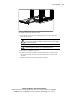
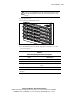
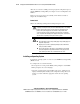
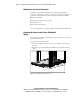
Figure 4-8. Aligning the rear end of the server fixed rails with the front end of
the fixed rails mounted to the universal rack rails
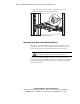
4. Insert the server into the rack, ensuring that the server fixed rails slide
inside the fixed rails.
WARNING: To reduce the risk of personal injury, be careful when pressing the
server rail-release latches and sliding the component into the rack. The sliding
rails could pinch fingertips.
CAUTION: Keep the server parallel to the floor when sliding the server fixed
rails into the fixed rails. Tilting the server could damage the rails.
5. Slide the server fully into the rack.
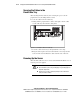
6. Position the front panel thumbscrews through the holes on both sides of
the rack and into the round, threaded holes in the front of the universal
rack rails.
7. Tighten the thumbscrews by turning them clockwise.