
Compaq ProLiant DL360 Generation 2 Server Setup and Installation Guide

Installing Hardware Options 3-37
Compaq Confidential – Need to Know Required
Writer: Ed Giblin Project: Compaq ProLiant DL360 Generation 2 Server Setup and Installation Guide Comments:
Part Number: 233832-001 File Name: d-ch3 Installing Hardware Options.doc Last Saved On: 8/31/01 11:44 AM
Installing Hot-Plug Wide Ultra3 SCSI Hard
Drives
The following procedure details installation for new hot-plug Wide Ultra3
SCSI hard drives.
IMPORTANT: To replace a drive that is part of an array, observe the “Hot-Plug SCSI Hard
Drive Replacement Guidelines” in the Compaq Servers Troubleshooting Guide on the
Documentation CD.
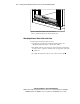
To install new hot-plug Wide Ultra3 SCSI hard drives:
1. Proceed with one of the following steps:
GWhen replacing an existing hard drive, ‘back up’ all required data,
on the server and proceed with step 2.
GTo add a new hard drive to an empty bay, proceed with step 4.
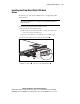
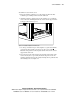
2. Press the release button on the existing SCSI hard drive
.
1
2
3
Figure 3-34. Removing a hot-plug SCSI hard drive
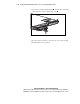
3. Pull the ejector lever and remove the SCSI hard drive .