
Compaq ProLiant DL360 Generation 2 Server Setup and Installation Guide

Installing Hardware Options 3-19
Compaq Confidential – Need to Know Required
Writer: Ed Giblin Project: Compaq ProLiant DL360 Generation 2 Server Setup and Installation Guide Comments:
Part Number: 233832-001 File Name: d-ch3 Installing Hardware Options.doc Last Saved On: 8/31/01 11:44 AM
Memory
Server memory may be expanded by installing Compaq Synchronous DRAM
(SDRAM). The system supports up to four 133-MHz ECC registered SDRAM
Dual Inline Memory Modules (DIMMs) installed in sockets on the system
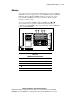
board. Identify the DIMM sockets on the system board. Memory must be
added two modules at a time.
The server ships with two DIMMs installed in DIMM sockets
and .
Server memory may be expanded to 4 GB. In the maximum memory
configuration, all four DIMM sockets are populated with 1-GB 133-MHz ECC
registered SDRAM DIMMs.
1 2 3 4
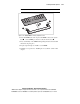
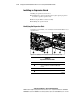
Figure 3-14. Identifying DIMM sockets on the system board
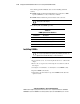
Table 3-3
DIMM Socket Identification
Location Description
DIMM socket 1 populated with standard 128-MB DIMM
DIMM socket 2 populated with standard 128-MB DIMM
DIMM socket 3
DIMM socket 4