
Compaq ProLiant DL360 Generation 2 Server Setup and Installation Guide

3-16 Compaq ProLiant DL360 Generation 2 Server Setup and Installation Guide
Compaq Confidential – Need to Know Required
Writer: Ed Giblin Project: Compaq ProLiant DL360 Generation 2 Server Setup and Installation Guide Comments:
Part Number: 233832-001 File Name: d-ch3 Installing Hardware Options.doc Last Saved On: 8/31/01 11:44 AM
Installing a New Processor
To install a new processor:
1. Power down the server. See “Powering Down the Server” earlier in this
chapter.
2. Remove the access panel. See “Removing the Access Panel” earlier in
this chapter.
3. If a processor is already in the processor socket, remove the processor.
See “Removing a Processor” earlier in this chapter.
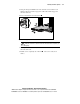
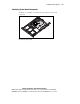
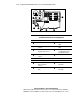
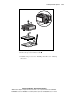
4. Lift the processor locking lever
and insert the processor into the
vacant processor socket
.
IMPORTANT: The processor pins must be aligned to seat the processor into the socket.
5. Close the lever to lock the processor into the socket.
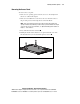
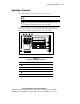
6. Remove the plastic strip
from a new, unused heat sink and expose
the adhesive side of the integrated thermal pad.
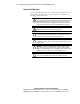
CAUTION: Always install a new thermal pad and heat sink when replacing
processors. Failure to use new components may result in processor damage.
7. Place the heat sink onto the processor ensuring that the pad is
centered on the raised portion of the processor.
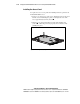
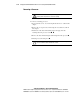
8. Push down on the heat sink retaining clip
, and engage the locking tab,
then release the clip to secure the thermal pad and heat sink to the top of
the processor.