
Compaq ProLiant DL360 Generation 2 Server Setup and Installation Guide

3-14 Compaq ProLiant DL360 Generation 2 Server Setup and Installation Guide
Compaq Confidential – Need to Know Required
Writer: Ed Giblin Project: Compaq ProLiant DL360 Generation 2 Server Setup and Installation Guide Comments:
Part Number: 233832-001 File Name: d-ch3 Installing Hardware Options.doc Last Saved On: 8/31/01 11:44 AM
Removing a Processor
WARNING: To reduce the risk of personal injury from hot surfaces, allow the
internal system components to cool before touching.
To remove an existing processor:
1. Power down the server. See “Powering Down the Server” earlier in this
chapter.
2. Remove the access panel. See “Removing the Access Panel” earlier in
this chapter.
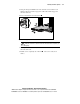
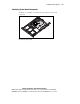
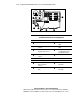
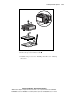
3. Push down on the heat-sink retaining clip to disengage from the
retaining tab on the processor socket
, .
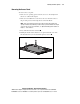
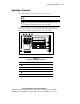
4. Remove the heat sink and integrated thermal pad from the processor .
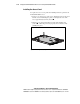
5. Lift the processor locking lever
.
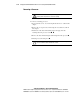
CAUTION: To ensure correct thermal transfer, do not reuse thermal pads from
processors that have been removed from a server.