
Compaq ProLiant DL360 Generation 2 Server Setup and Installation Guide

Installing Hardware Options 3-13
Compaq Confidential – Need to Know Required
Writer: Ed Giblin Project: Compaq ProLiant DL360 Generation 2 Server Setup and Installation Guide Comments:
Part Number: 233832-001 File Name: d-ch3 Installing Hardware Options.doc Last Saved On: 8/31/01 11:44 AM
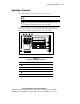
Upgrading a Processor
ProLiant DL360 G2 servers support dual-processor operation.
CAUTION: Do not mix processors of different types or speeds.
CAUTION: Electrostatic discharge can damage electronic components. Be sure
you are properly grounded before beginning any installation procedure. See
Appendix B, “Electrostatic Discharge,” for more information.
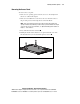
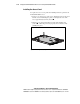
To remove or install processors refer to the label attached to the inside of the
access panel, to the processor option kit, or use the following procedures.
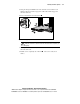
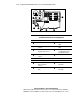
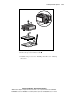
Figure 3-10 and Table 3-2 shows the processor socket locations.
1 2 3 4
Figure 3-10. Locating processors and sockets
Table 3-2
Processor and Socket Locations
Location Description
PPM socket 1 (populated)
Processor socket 1 (populated)
Processor socket 2
PPM socket 2
Note: A PPM must be installed with a processor