
Compaq ProLiant DL360 Generation 2 Server Setup and Installation Guide

3-10 Compaq ProLiant DL360 Generation 2 Server Setup and Installation Guide
Compaq Confidential – Need to Know Required
Writer: Ed Giblin Project: Compaq ProLiant DL360 Generation 2 Server Setup and Installation Guide Comments:
Part Number: 233832-001 File Name: d-ch3 Installing Hardware Options.doc Last Saved On: 8/31/01 11:44 AM
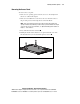
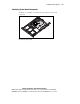
Installing the Access Panel
To replace the server access panel after installing hardware options for the
ProLiant DL360 G2 server:
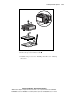
1. Set the access panel on top of the server, aligning the sides of the panel
with the server and allowing the panel to extend past the rear of the
server approximately 0.5 inch (1.25 cm)
.
2. Slide the access panel toward the front of the unit about 0.5 inch
(1.25 cm)
. When the panel seats properly, the hood latches click
(audibly) into place.
2
1
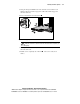
Figure 3-7. Installing the access panel