
Compaq ProLiant DL360 Generation 2 Server Setup and Installation Guide

3-6 Compaq ProLiant DL360 Generation 2 Server Setup and Installation Guide
Compaq Confidential – Need to Know Required
Writer: Ed Giblin Project: Compaq ProLiant DL360 Generation 2 Server Setup and Installation Guide Comments:
Part Number: 233832-001 File Name: d-ch3 Installing Hardware Options.doc Last Saved On: 8/31/01 11:44 AM
Removing the Server from the Rack
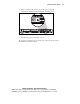
1. Disconnect all the cables from the server rear panel (including cables
extending from expansion boards), moving from left to right
.
1
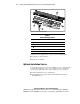
Figure 3-3. Disconnecting cables from the server rear panel
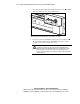
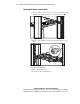
2. Fully loosen the thumbscrew that secures the fixed cable tray to the
server.
Figure 3-4. Loosening the thumbscrew that secures the fixed cable tray to the
server (cables removed for clarity)
3. Move to the front of the rack.
4. Loosen the front panel thumbscrews.