
Compaq ProLiant DL360 Generation 2 Server Setup and Installation Guide

Installing Hardware Options 3-5
Compaq Confidential – Need to Know Required
Writer: Ed Giblin Project: Compaq ProLiant DL360 Generation 2 Server Setup and Installation Guide Comments:
Part Number: 233832-001 File Name: d-ch3 Installing Hardware Options.doc Last Saved On: 8/31/01 11:44 AM
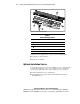
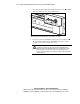
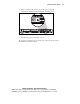
5. At the rear of the rack locate the server being powered down by
identifying the illuminated rear Unit Identification LED switch.
Figure 3-2. Locating the Rear Unit Identification LED switch on the rear panel
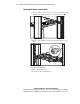
6. Disconnect the power cord from the server.
The system is now without power and ready to be removed from the rack for
the installation of hardware options.