
Compaq ProLiant DL360 Generation 2 Server Setup and Installation Guide

1-6 Compaq ProLiant DL360 Generation 2 Server Setup and Installation Guide
Compaq Confidential – Need to Know Required
Writer: Ed Giblin Project: Compaq ProLiant DL360 Generation 2 Server Setup and Installation Guide Comments:
Part Number: 233832-001 File Name: b-ch1 Server Features.doc Last Saved On: 10/12/01 9:39 AM
Mass Storage Devices
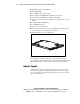
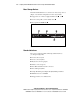
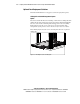
The ProLiant DL360 G2 server can house two mass storage devices
(Figure 1-2). Standard configurations for drive bays include:
■ Support for two 1-inch, hot-plug SCSI hard drives and
■ A fixed, low-profile 3.5-inch diskette drive
■ Low profile CD-ROM drive
4
1 2 3
Figure 1-2. ProLiant DL360 G2 server drive bay positions (front view)
Standard Interfaces
The server is equipped with the following standard interfaces
(see Chapter 4, Fig 4-10):
■ Serial connector (teal)
■ Video connector (blue)
■ Keyboard connector (purple)
■ Mouse connector (green)
■ Two Ethernet RJ-45 network connectors
■ Two USB ports (black)
■ Single RJ-45 Integrated Lights Out (iLO) Management Port
■ IDE interface for a CD-ROM
■ Floppy interface for a diskette drive