
Compaq ProLiant DL360 Generation 2 Server Setup and Installation Guide

D-4 Compaq ProLiant DL360 Generation 2 Server Setup and Installation Guide
Compaq Confidential – Need to Know Required
Writer: Ed Giblin Project: Compaq ProLiant DL360 Generation 2 Server Setup and Installation Guide Comments:
Part Number: 233832-001 File Name: o-appd Switches and Jumpers.doc Last Saved On: 8/31/01 11:46 AM
Enabling ROMPaq Disaster Recovery Mode
A corrupted system ROM will require recreation of the ROM BIOS by a
process called ROM flash. This can be accomplished only when the system is
in disaster recovery mode.
IMPORTANT: Before performing this operation, refer to the Compaq Servers
Troubleshooting Guide for complete instructions on disaster recovery.
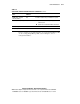
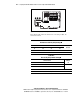
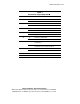
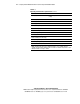
To enable disaster mode, set configuration switches 1, 4, 5, and 6 on the SW4,
miscellaneous support, switch block to on.
Setting the NIC Operating Mode
ProLiant DL360 G2 servers come standard with two Compaq NC7780 Gigabit
10/100/1000 Mbps network interface controllers (NICs). The NIC
automatically configures the link to support the highest possible speed based
on link partner capability and characteristics of the channel.
Changing SCSI Device Jumper Settings
SCSI devices connected to the same SCSI controller must have different SCSI
IDs. With a ProLiant DL360 G2 server, do not change SCSI device jumper
settings because the system automatically sets the SCSI ID for all devices,
internally and externally. Ensure that all jumpers are set to ID0 (all bits off),
and allow the system to detect the drives and assign the proper ID.