
Compaq ProLiant DL360 Generation 2 Server Setup and Installation Guide

Status LED Indicators C-11
Compaq Confidential – Need to Know Required
Writer: Ed Giblin Project: Compaq ProLiant DL360 Generation 2 Server Setup and Installation Guide Comments:
Part Number: 233832-001 File Name: n-appc Status LED Indicators.doc Last Saved On: 8/31/01 11:45 AM
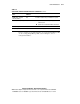
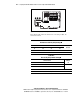
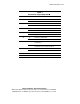
Table C-5
System LEDs and Internal Health LED Status Combinations
continued
System Board LED and
Color
Internal Health
LED Color
Status
DIMM failure, all slots in
all banks (Amber)
Red No valid or usable memory is installed in the system.
Over-temperature (Amber) Red
■ System has reached the operating system
cautionary level.
■ System has exceeded the hardware critical level.
Riser (Amber) Red PCI riser is unseated.
Fan (Amber) Red A CPU or Power Supply fan has failed.
For more detailed server health information, use Compaq Insight Manager XE.
See the “Compaq Insight Manager XE” section in Chapter 8, “Server
Configuration Utilities.”