
Compaq ProLiant DL360 Generation 2 Server Setup and Installation Guide

C-10 Compaq ProLiant DL360 Generation 2 Server Setup and Installation Guide
Compaq Confidential – Need to Know Required
Writer: Ed Giblin Project: Compaq ProLiant DL360 Generation 2 Server Setup and Installation Guide Comments:
Part Number: 233832-001 File Name: n-appc Status LED Indicators.doc Last Saved On: 8/31/01 11:45 AM
The front panel health LED indicates only the current hardware status. In some
situations, Compaq Insight Manager XE may report server status differently
than the health/system board LEDs because the software tracks more system
attributes.
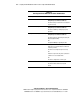
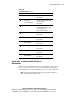
Table C-5
System LEDs and Internal Health LED Status Combinations
System Board LED and
Color
Internal Health
LED Color
Status
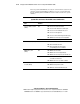
Red
■ Processor in socket X has failed.
■ Processor X has failed over to offline spare.
■ Processor X is not installed in the socket.
■ Processor X is unsupported.
■ Processors are mismatched (speed and/or type).
■ ROM detects a failed processor during POST.
Processor failure, socket X
(Amber)
Amber Processor in the socket is in a pre-failure condition.
PPM failure, slot X (Amber) Red
■ PPM in slot X has failed.
■ PPM is not installed in slot X.
■ PPM is not installed in slot X, but the
corresponding processor is installed.
Red
■ DIMM in slot X has failed.
■ DIMM in slot X is an unsupported type.
■ DIMM in slot X has experienced a multi-bit error.
DIMM failure, slot X
(Amber)
Amber
■ DIMM in slot X has reached single-bit
correctable error threshold.
■ DIMM in slot X is in a pre-failure condition.
DIMM failure, all slots in
one bank (Amber)
Red Interleaving error:
■ DIMM is missing from the bank.
■ DIMMs are mismatched within the bank.
continued