
Compaq ProLiant DL360 Generation 2 Server Setup and Installation Guide

Status LED Indicators C-9
Compaq Confidential – Need to Know Required
Writer: Ed Giblin Project: Compaq ProLiant DL360 Generation 2 Server Setup and Installation Guide Comments:
Part Number: 233832-001 File Name: n-appc Status LED Indicators.doc Last Saved On: 8/31/01 11:45 AM
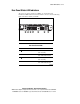
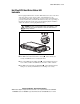
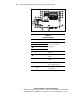
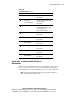
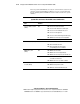
Table C-4
System Board LEDs
continued
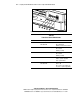
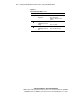
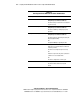
Item LED Description Status
Power Supply Failed Amber = Fan failed
Off = Normal
Riser failure
Power Supply Failed
Amber = PCI riser assembly not
seated or installed
Off = Normal
Over-temperature Amber = Temperature has
exceeded OS cautionary level or
critical hardware level
Off = Temperature is OK
SCSI Buss error Amber = Checksum error
Off = Normal
CPU Fan Failure Amber = Fan Failed
Off = Fan OK
Processor Power
Module (PPM) 2
Amber = PPM2 failed
Off = Normal
Processor 2 failure Amber = Processor failed
Off = Normal
Processor 1 failure Amber = Processor failed
Off = Normal
Processor Power
Module (PPM) 1
Amber = PPM1 failed
Off = Normal
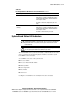
System LEDs and Internal Health LED Status
Combinations
When the internal health LED on the front panel illuminates either amber or
red, the server is experiencing a health event. Combinations of illuminated
system LEDs and the internal health LED indicate system status (Table C-5).
NOTE: For the internal health LED to provide pre-failure and system conditions, the
system management driver must be installed.