
Compaq ProLiant DL360 Generation 2 Server Setup and Installation Guide

Status LED Indicators C-7
Compaq Confidential – Need to Know Required
Writer: Ed Giblin Project: Compaq ProLiant DL360 Generation 2 Server Setup and Installation Guide Comments:
Part Number: 233832-001 File Name: n-appc Status LED Indicators.doc Last Saved On: 8/31/01 11:45 AM
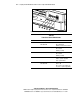
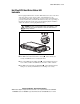
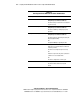
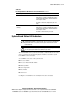
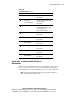
Table C-3
Hot-Plug Hard Drive LED Indicator Status Combinations
continued
Activity Online Fault
Condition
Off On Off OK to replace the drive online if a predictive
failure alert is received, provided that the array is
configured for fault tolerance and all other drives
in the array are online.
The drive is online and configured as part of an
array.
On or
Flashing
On Off OK to replace the drive online if a predictive
failure alert is received, provided that the array is
configured for fault tolerance and all other drives
in the array are online.
The drive is online and being accessed.
System Board Status LED Indicators
CAUTION: Only operate the system without the access panel for brief periods to
identify LEDs that diagnose problems with system components. Operating the
system without the access panel prevents proper airflow and can result in
thermal damage.
CAUTION: Electrostatic discharge can damage electronic components. Be sure
you are properly grounded before beginning any procedure.
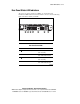
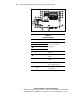
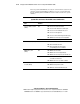
The internal LEDs on the system board identify conditions that are relevant to
service personnel. Use the following figure and table to determine system
board LED locations and status.
Several LEDs are located on the system board:
■ Processor failure
■ Processor Power Module failure
■ Memory failure
■ Over-temperature
■ Riser failure
■ SCSI error
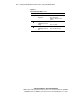
Use Figure C-4 and Table C-4 to identify their location and status.