
Compaq ProLiant DL360 Generation 2 Server Setup and Installation Guide

Status LED Indicators C-5
Compaq Confidential – Need to Know Required
Writer: Ed Giblin Project: Compaq ProLiant DL360 Generation 2 Server Setup and Installation Guide Comments:
Part Number: 233832-001 File Name: n-appc Status LED Indicators.doc Last Saved On: 8/31/01 11:45 AM
Hot-Plug SCSI Hard Drive Status LED
Indicators
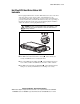
Each hot-plug SCSI hard drive has three LED indicators located on the front
of the drive. They provide activity, online, and fault status for each
corresponding drive when configured as a part of an array and attached to a
powered-on Smart Array Controller. Their behavior may vary, depending on
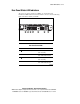
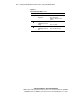
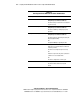
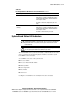
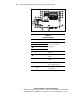
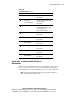
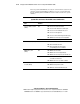
the status of other drives in the array. Use the following figure and table to
analyze the status of each hot-plug SCSI hard drive.
WARNING: Read the “Hot-plug Hard Drive Replacement Guidelines” in the
Compaq Servers Troubleshooting Guide on the Documentation CD before
removing a hard drive.
1
2
3
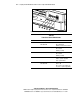
Figure C-3. Identifying the hot-plug SCSI hard drive LED indicators
■ The LED on the left indicates Drive Activity , where on indicates
activity and off indicates no activity by the drive.
■ The center LED indicates Online Status , where flashing indicates an
active online condition and off indicates an inactive online condition.
■ The LED on the right indicates Fault Status , where flashing indicates
fault-process activity and off indicates a no fault-process activity.