
Compaq ProLiant DL360 Generation 2 Server Setup and Installation Guide

C-2 Compaq ProLiant DL360 Generation 2 Server Setup and Installation Guide
Compaq Confidential – Need to Know Required
Writer: Ed Giblin Project: Compaq ProLiant DL360 Generation 2 Server Setup and Installation Guide Comments:
Part Number: 233832-001 File Name: n-appc Status LED Indicators.doc Last Saved On: 8/31/01 11:45 AM
2
3
4
1
5
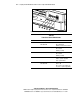
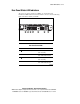
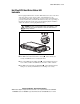
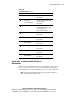
Figure C-1. Identifying the front panel status LED indicators
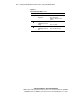
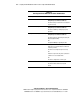
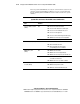
Table C-1
Front Panel Status LED Indicators
Location LED Description Status
Front Unit Identification switch
embedded LED
On = Activated
Off = Deactivated
Blinking = Remote Console Active
NIC 2 network link/activity On = Linked to network
Off = No Link
Blinking = Activity
NIC 1 network link/activity On = Linked to network
Off = No Link
Blinking = Activity
Internal Health Green = System healthy
Amber = System degraded
Red = System Failure
Power On/Standby switch
embedded LED
Amber = Standby
Green = On
Off = power cord not attached to
the server or power supply failure