
Compaq ProLiant DL360 Generation 2 Server Setup and Installation Guide
Compaq Confidential – Need to Know Required
Writer: Ed Giblin Project: Compaq ProLiant DL360 Generation 2 Server Setup and Installation Guide Comments:
Part Number: 233832-001 File Name: b-ch1 Server Features.doc Last Saved On: 10/12/01 9:39 AM
Chapter 1
Server Features
The dual processor capable ProLiantä DL360 Generation 2 server offers
state-of-the-art performance and on-board management with high availability
and tool-free serviceability in a dense rack-mount chassis. This robust 1U
[4.45 cm (1.75 inches)] server supports rapid deployment and configuration
flexibility, making it an unbeatable computing solution for high-density server
requirements.
A generation identifier (G2), located on the front of the server, indicates the
model of the server purchased. The generation identifier is required to
accurately identify the model for service and support. Throughout the user
documentation, G2 and Generation 2 are used interchangeably.
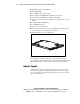
ProLiant DL360 Generation 2 Server
The Compaq ProLiant DL360 G2 server supports the latest processor and
system architecture technology, including the following components:
■ Dual-processor capability with Intel Flip-Chip Pin Grid Array
(FC-PGA2) Pentium III processors with speeds greater than 1.13 GHz
■ Synchronous DRAM (SDRAM) error-checking and correcting (ECC)
memory, which may be upgraded to a 4 GB maximum
■ Integrated Smart Array 5i Controller to provide Ultra3 RAID capability
■ Integrated Lights Out (iLO) Management Port
■ Two 1-inch hot-plug SCSI hard drive bays.
■ Two Compaq NC7780 Gigabit server NICs.