
Compaq ProLiant DL360 Generation 2 Server Setup and Installation Guide

7-2 Compaq ProLiant DL360 Generation 2 Server Setup and Installation Guide
Compaq Confidential – Need to Know Required
Writer: Ed Giblin Project: Compaq ProLiant DL360 Generation 2 Server Setup and Installation Guide Comments:
Part Number: 233832-001 File Name: h-ch7 Server Cabling.doc Last Saved On: 9/14/01 1:53 PM
2
1
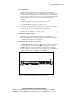
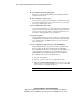
Figure 7-1. SCSI backplane seated properly on the system board
CD-ROM and Diskette Drives
The CD-ROM and diskette drives plug directly into the CD-ROM/diskette
drive backplane. An 80-pin cable plugged into this backplane connects to the
system board.
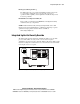
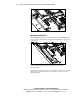
Figure 7-2. Cable routing from the CD-ROM/diskette drive backplane to
system board (power supply, cable protector, and PCI riser board assembly
removed for clarity)
The ProLiant DL360 G2 server does not support any additional internal mass
storage devices. To add mass storage device cables, see the next section
“External Cabling”.