
HP ProLiant DL360 G6 Server User Guide
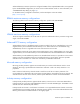
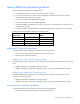
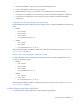
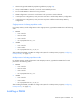
Table Of Contents
- HP ProLiant DL360 G6 Server User Guide
- Abstract
- Notice
- Contents
- Component identification
- Front panel components
- Front panel LEDs and buttons
- Rear panel LEDs and buttons
- System board components
- HP Systems Insight Display LEDs
- Systems Insight Display LED combinations
- SAS and SATA device numbers
- SAS and SATA hard drive LEDs
- SAS and SATA hard drive LED combinations
- Fan modules
- T-10/T-15 Torx screwdriver
- Operations
- Setup
- Hardware options installation
- Introduction
- Processor and fan module option
- Memory options
- Hot-plug SAS and SATA hard drive options
- DVD-ROM and DVD-RW drive option
- Hard drive blackplane option
- Controller options
- Expansion board options
- HP ProLiant DL360 G6 PCI thermal - power option
- HP NC522SFP Dual Port 10GbE Server Adapter option
- Redundant hot-plug power supply option
- HP Trusted Platform Module option
- Cabling
- Software and configuration utilities
- Troubleshooting
- System battery
- Regulatory compliance notices
- Regulatory compliance identification numbers
- Federal Communications Commission notice
- Declaration of conformity for products marked with the FCC logo, United States only
- Modifications
- Cables
- Canadian notice (Avis Canadien)
- European Union regulatory notice
- Disposal of waste equipment by users in private households in the European Union
- Japanese notice
- BSMI notice
- Korean notice
- Chinese notice
- Laser compliance
- Battery replacement notice
- Taiwan battery recycling notice
- Power cord statement for Japan
- Acoustics statement for Germany (Geräuschemission)
- Electrostatic discharge
- Specifications
- Technical support
- Acronyms and abbreviations
- Index
Hardware options installation 42
General DIMM slot population guidelines
Observe the following guidelines for all AMP modes:
• Populate DIMM slots for a processor only if the processor is installed.
• To maximize performance in multi-processor configurations, distribute the total memory capacity
between all processors as evenly as possible.
• Do not mix Unbuffered and Registered PC3 DIMMs.
• Each channel supports up to two Unbuffered DIMMs.
• If quad-rank DIMMs are installed for a processor, a maximum of two DIMMs can be installed on each
channel for that processor.
• If a channel contains quad-rank DIMMs, the quad-rank DIMM must be installed first on that channel.
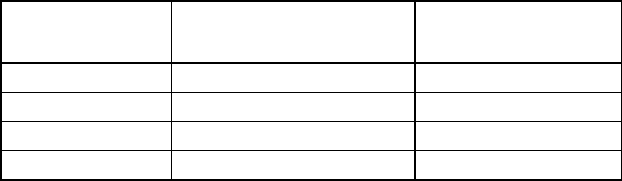
DIMM speeds are supported as indicated in the following table.
Populated slots
(per channel)
Rank
Speeds supported
(MHz)
1
Single- or dual-rank 1333, 1066
1
Quad-rank 1066
2
Single- or dual-rank 1066
3
Single- or dual-rank 800
Advanced ECC population guidelines
For Advanced ECC mode configurations, observe the following guidelines:
• Observe the general DIMM slot population guidelines (on page 42).
• DIMMs may be installed individually.
Single-processor Advanced ECC population order
For Advanced ECC mode configurations with a single processor, populate the DIMM slots in the following
order:
• RDIMM: Sequentially in alphabetical order (A through I)
• UDIMM: A through F, sequentially in alphabetical order. Do not populate DIMM slots G through I.
Multi-processor Advanced ECC population order
For Advanced ECC mode configurations with multiple processors, populate the DIMM slots for each
processor in the following order:
• RDIMM: Sequentially in alphabetical order (A through I)
• UDIMM: A through F, sequentially in alphabetical order. Do not populate DIMM slots G through I.
Mirrored Memory population guidelines
For Mirrored Memory mode configurations, observe the following guidelines:
• Observe the general DIMM slot population guidelines (on page 42).