
HP ProLiant DL360 G6 Server User Guide
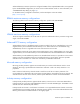
Table Of Contents
- HP ProLiant DL360 G6 Server User Guide
- Abstract
- Notice
- Contents
- Component identification
- Front panel components
- Front panel LEDs and buttons
- Rear panel LEDs and buttons
- System board components
- HP Systems Insight Display LEDs
- Systems Insight Display LED combinations
- SAS and SATA device numbers
- SAS and SATA hard drive LEDs
- SAS and SATA hard drive LED combinations
- Fan modules
- T-10/T-15 Torx screwdriver
- Operations
- Setup
- Hardware options installation
- Introduction
- Processor and fan module option
- Memory options
- Hot-plug SAS and SATA hard drive options
- DVD-ROM and DVD-RW drive option
- Hard drive blackplane option
- Controller options
- Expansion board options
- HP ProLiant DL360 G6 PCI thermal - power option
- HP NC522SFP Dual Port 10GbE Server Adapter option
- Redundant hot-plug power supply option
- HP Trusted Platform Module option
- Cabling
- Software and configuration utilities
- Troubleshooting
- System battery
- Regulatory compliance notices
- Regulatory compliance identification numbers
- Federal Communications Commission notice
- Declaration of conformity for products marked with the FCC logo, United States only
- Modifications
- Cables
- Canadian notice (Avis Canadien)
- European Union regulatory notice
- Disposal of waste equipment by users in private households in the European Union
- Japanese notice
- BSMI notice
- Korean notice
- Chinese notice
- Laser compliance
- Battery replacement notice
- Taiwan battery recycling notice
- Power cord statement for Japan
- Acoustics statement for Germany (Geräuschemission)
- Electrostatic discharge
- Specifications
- Technical support
- Acronyms and abbreviations
- Index
Hardware options installation 41
Advanced Memory Protection options are configured in RBSU. If the requested AMP mode is not supported
by the installed DIMM configuration, the server boots in Advanced ECC mode. For more information, see
"HP ROM-Based Setup Utility (on page 73)."
For the latest memory configuration information, see the QuickSpecs on the HP website
(http://www.hp.com).
RDIMM maximum memory configurations
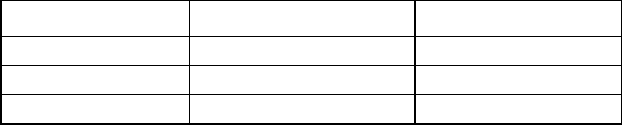
The following table lists the maximum memory configuration possible with 8-GB RDIMMs.
Rank Single-processor Dual-processor
Single-rank
72 GB 144 GB
Dual-rank
72 GB 144 GB
Quad-rank
48 GB 96 GB
UDIMM maximum memory configurations
The server supports a maximum of 12 GB with one processor and 24 GB with two processors using 2-GB
single- or dual-rank UDIMMs.
Advanced ECC memory configuration
Advanced ECC memory is the default memory protection mode for this server. Standard ECC can correct
single-bit memory errors and detect multi-bit memory errors. When multi-bit errors are detected using
Standard ECC, the error is signaled to the server and causes the server to halt.
Advanced ECC protects the server against some multi-bit memory errors. Advanced ECC can correct both
single-bit memory errors and 4-bit memory errors if all failed bits are on the same DRAM device on the DIMM.
Advanced ECC provides additional protection over Standard ECC because it is possible to correct certain
memory errors that would otherwise be uncorrected and result in a server failure. The server provides
notification that correctable error events have exceeded a pre-defined threshold rate.
Mirrored memory configuration
Mirroring provides protection against uncorrected memory errors that would otherwise result in server
downtime. Mirroring is performed at the channel level. Channels 1 and 2 are used; channel 3 is not
populated.
Data is written to both memory channels. Data is read from one of the two memory channels. If an
uncorrectable error is detected in the active memory channel, data is retrieved from the mirror channel. This
channel becomes the new active channel, and the system disables the channel with the failed DIMM.
Lockstep memory configuration
Lockstep mode provides protection against multi-bit memory errors that occur on the same DRAM device.
Lockstep mode can correct any single DRAM device failure on x4 and x8 DIMM types. The DIMMs in each
channel must have identical HP part numbers.
Lockstep mode uses channel 1 and channel 2. Channel 3 is not populated. Because channel 3 cannot be
populated when using Lockstep mode, the maximum memory capacity is lower than Advanced ECC mode.
Memory performance with Advanced ECC is also slightly higher.