
HP ProLiant DL360 G6 Server MSG

Removal and replacement procedures 58
9.
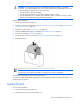
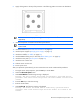
Apply all the grease to the top of the processor in the following pattern to ensure even distribution.
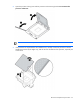
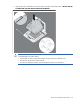
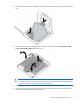
10. Install the heatsink ("Heatsink" on page 43).
IMPORTANT:
To ensure proper cooling, be sure the processor air baffle is installed at all times (if
applicable).
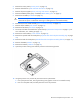
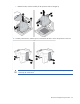
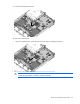
11. Install all components removed from the failed system board.
IMPORTANT: Install all components with the same configuration that was used on the failed
system board.
12. Install the hard drives ("SAS and SATA hard drive" on page 28).
13. Install all power supplies ("Hot-plug power supply" on page 29).
14. Install the air baffle ("Air baffle" on page 36).
15. Install the BBWC battery pack, if removed ("BBWC battery pack" on page 35).
16. Install the access panel ("Access panel" on page 26).
17. Install the server into the rack.
18. Slide the server into the rack.
19. Power up the server.
After you replace the system board, you must re-enter the server serial number and the product ID.
1. During the server startup sequence, press the F9 key to access RBSU.
2. Select the Advanced Options menu.
3. Select Serial Number. The following warning is displayed:
Warning: The serial number should ONLY be modified by qualified service
personnel. This value should always match the serial number located on the
chassis.
4. Press the Enter key to clear the warning.
5. Enter the serial number.
6. Select Product ID. The following warning is displayed.
Warning: The Product ID should ONLY be modified by qualified service
personnel. This value should always match the Product ID located on the
chassis.