
HP ProLiant DL360 G6 Server MSG

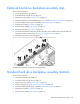

Removal and replacement procedures 34
3.
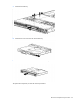
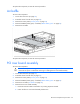
Remove the access panel ("Access panel" on page 26).
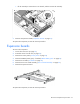
4. Remove the fan module.
To replace the component:
1. Install the fan module.
2. Install the access panel ("Access panel" on page 26).
3. Slide the server into the rack.
4. Power up the server.
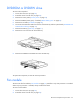
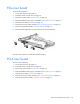
Fan blank
Install fan 2 only when processor 2 is installed. When only one processor is installed, always install the fan
blank.
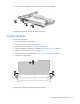
To remove the component:
1. Power down the server (on page 23).
2. Extend the server from the rack (on page 24).
3. Remove the access panel ("Access panel" on page 26).