
HP ProLiant DL360 G6 Server MSG


Removal and replacement procedures 33
DVD-ROM or DVD-RW drive
To remove the component:
1. Power down the server (on page 23).
2. Extend the server from the rack (on page 24).
3. Remove the access panel ("Access panel" on page 26).
4. Remove the BBWC battery pack, if installed ("BBWC battery pack" on page 35).
5. Remove the air baffle ("Air baffle" on page 36).
6. Disconnect the SATA DVD cable from the rear of the DVD tray and the system board ("DVD-ROM and
DVD-RW drive cabling" on page 79).
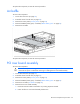
7. Remove the DVD tray ("DVD tray" on page 31).
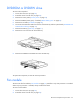
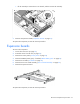
8. Remove the screw from the rear of the DVD tray.
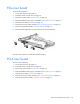
9. Remove the DVD-ROM or DVD-RW drive from the DVD tray.
To replace the component, reverse the removal procedure.
Fan module
The server has four fan modules ("Fan modules" on page 75). Install fan 2 only when processor 2 is installed.
When only one processor is installed, always install the fan blank.
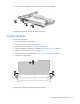
To remove a fan module:
1. Power down the server (on page 23).
2. Extend the server from the rack (on page 24).