
HP ProLiant DL360 G6 Server MSG


Removal and replacement procedures 30
5.
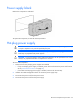
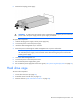
Remove the hot-plug power supply.
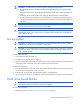
WARNING: To reduce the risk of electric shock or damage to the equipment, do not connect the
power cord to the power supply until the power supply is installed.
To replace the component:
1. Slide the hot-plug power supply into the power supply bay.
2. Connect the power cord to the power supply.
3. Install the cable management arm, if removed.
4. Route the power cord through the cable management arm or power cord anchor.
NOTE:
If using the power cord anchor, be sure to leave enough slack in the power cord so that
the redundant power supply can be removed without disconnecting the power cord from the
primary power supply.
5. Close the cable management arm.
6. Connect the power cord to the power source.
7. Be sure that the power supply LED is green.
8. Be sure that the power supply LED on the SID is green ("HP Systems Insight Display LEDs" on page 70).
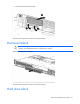
Hard drive cage
To remove the component:
1. Power down the server (on page 23).
2. Extend the server from the rack (on page 24).
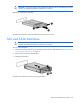
3. Remove all drives ("SAS and SATA hard drive" on page 28).