
HP ProLiant DL360 G6 Server MSG


Removal and replacement procedures 28
CAUTION: To prevent improper cooling and thermal damage, do not operate the server unless
all bays are populated with either a component or a blank.
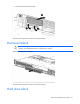
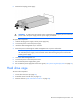
Remove the component as indicated.
To replace the component, slide the component into the bay until it clicks.
SAS and SATA hard drive
CAUTION: To prevent improper cooling and thermal damage, do not operate the server unless
all bays are populated with either a component or a blank.
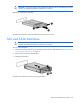
To remove the component:
1. Determine the status of the drive from the hot-plug SAS hard drive LED combinations ("SAS and SATA
hard drive LED combinations" on page 74).
2. Back up all server data on the hard drive.
3. Remove the hard drive.
To replace the component, reverse the removal procedure.