
HP Proliant DL360 G6 Carrier-Grade Server Read Before Install





4 Changing the Settings on the System Maintenance Switch
WARNING! To prevent personal injury from hazardous energy, remove watches, rings, or
other metal objects.
1. Power off the server.
2. Remove power to the server.
3. Remove the top cover.
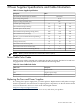
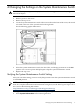
4. Locate the system maintenance switch. When viewed from the front of the server, the switch
is located at the rear of the system board on the right side.
See the following graphic illustration:
5. Select the system maintenance switch, the ID is SW1, and change position #10 to the ON
position. You can use a plastic ball-point pen to flip the system maintenance switch.
6. Replace the top cover.
Verifying the System Maintenance Switch Setting
After you switch the setting, you must verify that position #10 on the system maintenance switch
is in the ON position.
NOTE: The following instructions which verify the thresholds are correct, use HP Integrity
iLO2. For complete information and instructions using iLO2, see the HP Integrated Lights-Out 2
User Guide at the following HP website:
http://h20000.www2.hp.com/bizsupport/TechSupport/Home.jsp
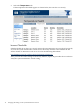
1. Log in to iLO2. For instruction, see the HP Integrated Lights-Out 2 User Guide.
2. Select System Information on the left navigation bar.
Verifying the System Maintenance Switch Setting 9