
HP ProLiant DL360 Generation 5 Server Maintenance and Service Guide

Removal and replacement procedures 51
IMPORTANT: Processor socket 1 must be populated at all times or the server does not function.
IMPORTANT: If upgrading processor speed, update the system ROM before installing the
processor.
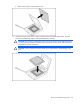
To remove a processor:
1. Update the system ROM.
Locate and download the latest ROM version from the HP website
(http://h18023.www1.hp.com/support/files/server/us/romflash.html
). Follow the instructions on
the website to update the system ROM.
2. Power down the server (on page 27).
3. Extend or remove the server from the rack ("Extend the server from the rack" on page 27, "Remove
the server from the rack" on page 28).
4. Remove the access panel ("Access panel" on page 28).
5. Remove the power supply air baffle, if necessary ("Power supply air baffle" on page 37).
6. Remove the processor air baffle ("Processor air baffle" on page 37).
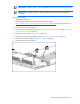
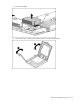
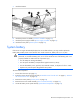
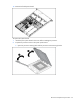
7. Open the heatsink retaining latches.