
HP ProLiant DL360 Generation 5 Server Maintenance and Service Guide

Removal and replacement procedures 44
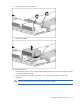
13.
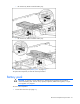
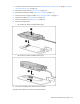
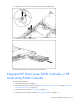
Remove the backplane.
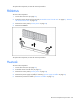
To replace the component, reverse the removal procedure.
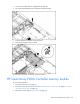
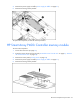
Systems Insight Display
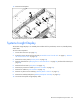
The Systems Insight Display is an assembly that includes the front panel LEDs, Power On/Standby button,
and a cable.
To remove the component:
1. Power down the server (on page 27).
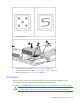
2. Extend or remove the server from the rack ("Extend the server from the rack" on page 27, "Remove
the server from the rack" on page 28).
3. Remove the access panel ("Access panel" on page 28).
4. Remove all hard drives ("Hot-plug SAS or SATA hard drives" on page 29) and hard drive blanks (on
page 28).
5. Remove the front bezel ("Front bezel" on page 30).
6. Remove the processor air baffle ("Processor air baffle" on page 37).
7. Remove fan module 3 ("Fan modules" on page 38).
8. Remove any device in the multibay ("Multibay blank or device" on page 31).
9. Remove the multibay backplane ("Multibay backplane assembly" on page 39).
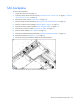
10. Disconnect the Systems Insight Display cable.