
HP ProLiant DL360 Generation 5 Server Maintenance and Service Guide

Removal and replacement procedures 43
SAS backplane
To remove the component:
1. Power down the server (on page 27).
2. Extend or remove the server from the rack ("Extend the server from the rack" on page 27, "Remove
the server from the rack" on page 28).
3. Remove the access panel ("Access panel" on page 28).
4. Remove all SAS or SATA hard drives ("Hot-plug SAS or SATA hard drives" on page 29).
5. Remove any device in the multibay ("Multibay blank or device" on page 31).
6. Remove the power supply air baffle ("Power supply air baffle" on page 37).
7. Remove the processor air baffle. ("Processor air baffle" on page 37)
8. Remove all fan modules ("Fan modules" on page 38).
9. Remove the multibay backplane assembly ("Multibay backplane assembly" on page 39).
10. Remove the battery tray ("Battery tray" on page 40).
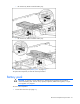
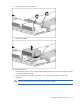
11. Disconnect the power and data cables from the SAS backplane.
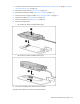
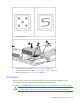
12. Remove the three T-15 Torx screws from the backplane.