
HP ProLiant DL360 Generation 5 Server Maintenance and Service Guide

Removal and replacement procedures 42
2.
Extend or remove the server from the rack ("Extend the server from the rack" on page 27, "Remove
the server from the rack" on page 28).
3. Remove the access panel ("Access panel" on page 28).
4. Remove the processor air baffle ("Processor air baffle" on page 37).
5. Remove the power supply air baffle ("Power supply air baffle" on page 37).
6. Remove fan module 2 ("Fan modules" on page 38).
7. Remove the battery tray ("Battery tray" on page 40).
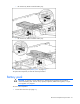
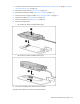
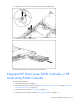
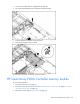
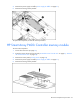
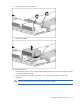
8. Remove the battery pack:
o HP Smart Array E200i Controller battery pack
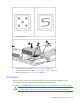
o HP Smart Array P400i Controller battery pack
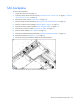
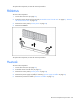
9. Disconnect the battery pack cable from the controller.
To replace the component, reverse the removal procedure.