
HP ProLiant DL360 Generation 5 Server Maintenance and Service Guide

Removal and replacement procedures 35
1.
Power down the server (on page 27).
2. Extend or remove the server from the rack ("Extend the server from the rack" on page 27, "Remove
the server from the rack" on page 28).
3. Remove the access panel ("Access panel" on page 28).
4. Remove the PCI riser board assembly:
a. Disconnect external cables connected to any existing expansion boards.
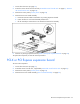
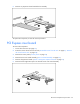
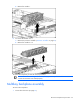
b. Loosen the four PCI riser board assembly thumbscrews.
c. Lift the assembly to unseat the PCI riser boards and remove the assembly.
5. Remove any existing expansion boards ("PCI-X or PCI Express expansion board" on page 35).
To replace the component, reverse the removal procedure.
PCI-X or PCI Express expansion board
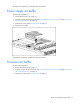
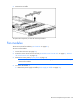
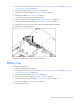
To remove the component:
1. Power down the server (on page 27).
2. Extend the server from the rack, if applicable ("Extend the server from the rack" on page 27).
3. Remove the access panel ("Access panel" on page 28).
4. Remove the PCI riser board assembly ("PCI riser board assembly" on page 34).